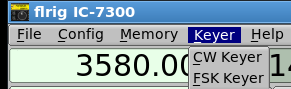
Open the FSK keyer dialog
with the main dialog menu item "Keyer/FSK keyer".
-
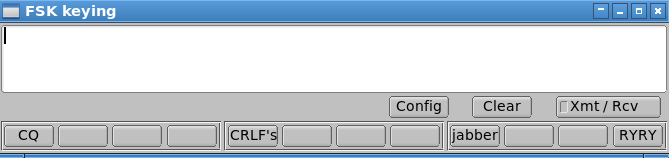
Clear - clears the text in the transmit buffer.
-
SHIFT Clear - clears the text in the sent characters display
-
Transmit text will marquee to the left as each character is transmitted.
-
As each character is sent, it is appended to the sent display.
-
Xmt/Rcv button toggles sending text.
-
Macro buttons / function keys load transmit buffer with canned message.
-
Left click to load macro contents into transmit buffer.
-
Control left click to open macro editor dialog.
The transmit text buffer must have keyboard focus for character entry. left click on the entry area to gain keyboard focus.
Config opens:
The DTR/RTS port can be either
-
shared with the CAT port
-
shared with the AUX port
-
shared with the SEP port
-
shared port with CWIO (if separate)
-
a unique serial port configured on this dialog
-
Inverted - enable if interface requires a Mark/Space reversed signal level
-
select either DTR or RTS for the keyline as required by h/w, selection must not conflict with CW keyline
PTT delay is in milliseconds. Enter a non-zero value to enable a delay between the PTT-on and the first FSK keyline closure. The same delay will be applied to the last FSK keyline closure and PTT-off.
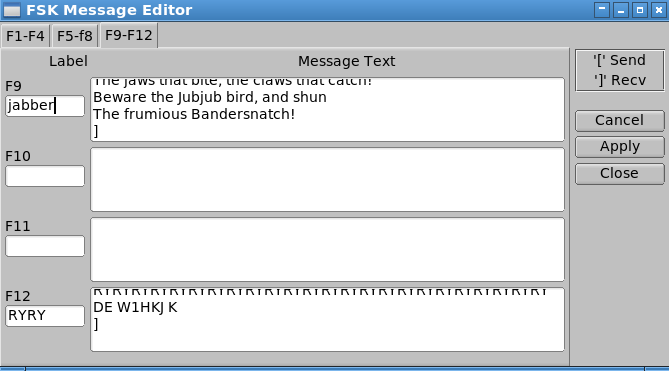
Control-left-click opens:
An RY macro with start/stop (ptt enable/disable):
[RYRYRYRYRYRYRYRYRYRYRYRYRYRYRYRYRYRYRYRYRYRYRYRY DE W1HKJ K]
Return to Contents


 1.9.1
1.9.1